Iconify for BlackBerry® Devices
with OS 4.3 or higher

|
Iconify Homepage
Quick access to
Your Contacts (Dial or Mail), Applications, Websites & Files/Folders
Create App,- File-, Web-, Dial- & MailLinks with individual
icons directly on your HomeScreen
|
Iconify is for all BlackBerry® devices with OS 4.3 or higher (incl. OS7) [like 81xx, 82xx, 83xx, 85xx, 87xx, 88xx, 9000(Bold) 9500/9520(Storm), 9530/9550(Strom2), 96xx, 97xx(Bold2), 98xx(Torch) or 99xx and all new JAVA-BASED BlackBerry smartphone devices that will be released in the future (no support for Devices running BBX!)].
The basic principle of Iconify is to allow you to create quick access links to all of your favorite contacts, websites, applications and files/folders, making you and your BlackBerry more efficient then ever.
Iconify Core Features:
 |
Please Note:
For some reason it could happen, that your BlackBerry® HomeScreen will loose the name, picture or both of your created IconifyLinks - e.g. when you deinsall an application via the options or changing the active theme. In this case, go to BlackBerry® Options select 'Iconify Options' and choose 'Refresh all IconifyLinks' from the list.
|
|
|
Quick Instructions
How to create an IconifyLink?
1a) IconifyDial- & IconifyMailLinks
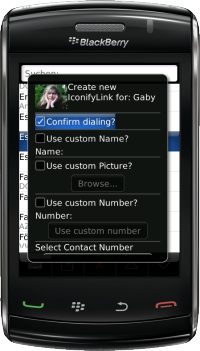
Open you BlackBerry® AddressBook and select any Contact from the list then simply open the #Menu and select 'Create Dial IconifyLink' or 'Create Mail IconifyLink'.
1b) IconifyWebLinks
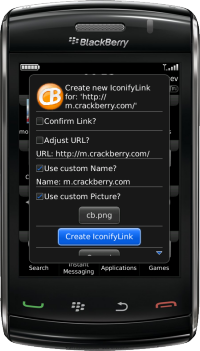
When you are using the BlackBerry® Browser and you would like to create a link to the current website/page then simply open the #Menu at any time and select 'Create Web IconifyLink'.
1c) IconifyFileLinks
Either you use the build in File app [OS4.x: Start the Media App and select 'Explore' from the #Menu] to create Iconify FileLinks or (if you have not already) install FileScout or the 100% free FileScoutLite to browse over the file system of your BlackBerry® device and select any folder or file and choose 'Create File IconifyLink' from the #Menu.
2) Common for all IconifyLinks
A dialog will open, that allows you to specify the IconifyLink details (like custom picture, custom name, custom phone number or email address). Once that is completed Iconify needs to install a IconifyLauncher for your new created link. This installation will not create any additional data charges and works 100% offline!
So when you are prompted to donwnload an 'IconifyLink_LNKxxxxx' then please press the 'Download' Button and once that step is completed, select 'Run' to initialize your newly created IconifyLink. Please note that fresh installed IconifyLinks typically can be found in the Download folder of your Homesceen (if not configured different).
Where to find the Iconify Options?
Since Iconify is some sort of system application there is no own user interface or icon at your BlackBerry® Homescreen - When you like to configure Iconify (or like to edit existing IconifyLinks) then this can be done within the BlackBerry® Options dialog itself. Simply open the default options and select the 'Iconify Options'.
Detailed instructions?
Additional Notes
- Iconify is available as 15Link and as 50Link Version.
- Unfortunately there is no upgrade path from the 15Link to the 50Link Version. If you purchase the 15Link version ans realize later that this is not sufficient enough for your needs, you can pass the 15Link Registration Code to a friend and purchase a new 50Link Registration Code.