100% free GPSLogger & Geocaching Software for BlackBerry® Devices
with OS 4.6 or higher (v1.x for OS 4.2.1)

|
GPSLogger II - Outdoor Navigation - Introduction [100% free 100% offline]
A
straight forward application, to record your movement with your
BlackBerry® device over time
+ Simple
Geocache Application for BlackBerry® devices
+
Outdoor Navigation
+ Lap
Timer
|
First of all you have to know, that GPSLogger II supports two different
ways to guide you to a certain place. In one of the modes you will be
guided directly into the direction of a previously recorded location
(Location-Mode) in the second one you will be guided along a previously
loaded path (Path-Mode). It is very important that you understand the
core difference between both cases.
The first one is suitable for geocaching or situation like finding your
car in a parking lot or similar tasks. The direction view of GPSLogger
II will point always into the direction of the location that you want
to reach – no matter whether there are barriers between you and your
target like buildings, rivers or canyons. So basically you have to find
the correct route (streets, paths, hikes) to your destination by
yourself – so don’t simply look on your display and walk into the
direction the arrow is pointing – this might hurt (or result in a
catastrophic failure :D) -
Disclaimer: The author of this software cannot be held
responsible for any damage, harm, injuries caused by the use of
GPSLogger II.
The Second mode should be used, if you want to follow a previously
recorded path “waypoint by waypoint”. It’s not important if you have
recorded the path by yourself or if you downloaded a path recorded by
somebody else [e.g. a cycling or hiking (round)trip that you have
downloaded in GPX or KML format from a website like '
GPSies
- Tracks for Vagabonds'].
Having in mind that a path is nothing more than a list of locations
which follow each other the concept of outdoor navigation is working in
GPSLogger II is quite easy to understand.
Before you start you have to know, in which direction your
previously recorded path (or imported GPX file) is pointing to. The
locations on the path are ordered from point A to the point B or from
B to A (or if they are ordered clockwise or counter clockwise for
roundtrips). This is a very important aspect for "your" way
and the direction you want to take. In this documentation it is
assumed that you have a path that is going from point A to point B and
you want to follow it in the same direction (so you are currently at
location A and want to arrive at location B).
For the proper functionality of the
outdoor navigation in GPSLogger II two settings in the options dialog
have been introduced which have a major influence on the behaviour of
the navigation software. If you have understood the concept how
outdoor navigation is working in GPSLogger II you can adjust these two
values 'When Waypoint is reached' & 'Distance to next Waypoint' to
your likings. In this documentation it is assumed the following
(default) values are present:
- When Waypoint is reached: 15m/50 ft
- Distance to next Waypoint: 250m/820 ft
Please note that you do not have to be in logging mode in order
to use the outdoor navigation function of GPSLogger II.
- Start GPSLogger II and open the Path-Manager (key shortcut:
[SHIFT]+[M])
- Select the path you would like to follow
- Select
(key shortcut: [N])
If you would had been at location B and
want to go to location A, then you have to select (key
shortcut: [SHIFT]+[N])
- GPSlogger will now calculate the nearest Waypoint (on the
loaded Path) from your current location – this Waypoint becomes the
first location, to which GPSLogger II will be guiding you (pointing
towards the direction in the direction view).
Please note, that the direction view is highly dependent based on
your current course. In order that your BlackBerry® device is
able to calculate your current course you have to be in
movement. In any other case you will notice that the compass needle
will be just rotating randomly – in the case that your device have
difficulties to calculate the course please switch to the path view
because this provides you also a good orientation in which direction
you have to go (use also the ZOOM IN function in this case).
Please note
additionally that it could happen, that the next waypoint will not
be calculated correctly (reported by a user) in this case please
make use of the [SHIFT]+[R] key shortcut in order to rerun the "find
closest point on the path to your current location and calculate the
next waypoint.
- Now you should move towards the direction GPSLogger II is
pointing to. Please have in mind (depending on your physical start
location) that GPSLogger II cannot take any natural barriers like
buildings or rivers into account. It will be assumed you are already
quite close to one of the locations that are along the path.
- When the distance between your current location and the point
to which GPSLogger II is pointing at the moment is less than
15m/50 ft (depending on your 'When Waypoint is reached' setting)
the current waypoint is considered as reached and the next waypoint
to reach will be automatically calculated and will be set as the new
location to reach.
- Now you are in a loop of step 6) until you reach the
final/last location (waypoint) that is recorded on the path and you
should then finally have reached your final destination.
Depending
on your sample interval GPSLogger II will change the color of the
path from light grey to dark grey when GPSLogger II believes you are
on the path. "Being on the path" means, that you reached
consequently the calculated locations. Once GPSLogger II is in this
mode only waypoint that are ahead in the navigation path will be
considered as possible next waypoints. You can reset this behavior by
using the [SHIFT]+[R] short cut key or selecting from the menu.
Once you have reached (or are close to) the location to which GPSLogger
II has guided you, the
next waypoint will be calculated automatically.Therefore
GPSLogger II will "look ahead" in the loaded navigation path and
calculates to each waypoint the distance from your current location –
once the distance of a waypoint is greater than 250m/820 ft
(depending on your 'Distance to next Waypoint' setting) it is qualified
to be the
next waypoint to which GPSLogger II will guide you. Each
location on your navigation path could become potentially a waypoint
during the outdoor navigation.
Technically GPSLogger II will not keep you on the navigation
path exactly waypoint by waypoint of the loaded navigation path – it
is more that the application will find the next point (on the path) in
the specified distance from your current location and take this point
as the "next" waypoint.
If you have a too small 'When Waypoint is reached' setting, or you have
to go an alternative route (e.g. because of an obstacle) it could
happen, that you do not reach the waypoint to which GPSLogger II is
trying to guide you too.
In this case GPSLogger II is able to detect, that you are actually
moving away from the target (instead of approaching it) and the
nearest waypoint on the path will be calculated again automatically
which could take few moments. Once the calculation is finished you
will be directed to the new location. If this auto correction fails
then there are additional menu items that could be used to get back on
your way. [see: key shortcuts]
When you are using outdoor navigation there is a big difference
compared to street navigation or also called Turn by Turn navigation.
In street navigation you can rely on edge calculations and relations.
Outdoors you do not have any kind of edge model that could be used.
This difference causes an issue you might encounter when you like to
start a round trip.
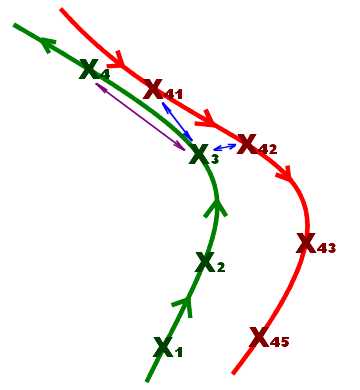
The image to the left is showing a typical round trip start
situation. The start and the end of the round trip have the same
waypoint. The green line in this diagram is the starting path while
the red one is the end of the round tip.
At the start of the navigation (or if the application failed to detect
the arrival at a waypoint) GPSLogger II is calculating the distance of
the current location to all points of the path. GPSlogger then assumes
that the point with the closest distance to your current location is
the best that can be chosen to start/continue with the navigation.
Most of the time this works quite rock solid – but in the illustrated
situation once you start at location X3 you will realize,
that this approach could lead to the wrong conclusion.
When you start your round trip near X3, then GPSLogger II
will calculate the closest point to your current location – and the
result of this calculation will be either X41 or X42
(both of them are of course on the way back home) and not X4
which is the point you want to arrive at.
Furthermore you have to know that once GPSLogger II believes
you are on the path it will be just looking ahead on the path to
calculate the next waypoint. So once GPSLogger II has taken X42
as your current location on the path it will continue guiding you to X43, X44
and X45. This is for sure not what you want! The good news
is that GPSLogger II will try to auto correct this error. Once the
distance of the location is increasing (a couple of times) instead of
(expected) decreasing GPSLogger II itself will assume it is somehow
off the current path and start to look again for the location that is
closest to your current location – in the example you are hopefully
much closer to X4 and GPSLogger II should find it finally.
So when you are on a round trip that has a common start and end point,
then expect some problems concerning the direction on which you will be
guided. Once you will leave the common part GPSLogger II will auto
correct its next target location and you should be finally on the right
way.
-
[SHIFT]+[R]
When you press space GPSLogger II falls back to it's
start procedure of the outdoor navigation - The nearest location in
the path will be calculated and the nearest by location will be your
next target. You will notice, that the color of the path path is
changing again to light grey and GPSLogger II will consider all
locations in the path again as possible next waypoints.
-
[SPACE]
This function will take the recorded path, invert it and load it
automatically as navigation path. Now instantly the pointer (in
direction mode) guides you to the last waypoint instantly (in the
specified distance). Once you have reached that point the application
will calculate automatically the waypoint before that - that continues
until you reach the origin (start point).
So this is a macro function for the manual steps: Stop logging
(& save path), open Path-Manager, select path & finally 'Load
inverted NaviPath'.
Even if you do not have to run the logger while you are following
another path it can have some benefits. When you are using the outdoor
navigation function of GPSLogger II you will have in the Timing-View
and in the direction view additional information about the distance
along the path between your current position and the final end point
and depending on your current speed the estimated time of arrival
(ETA).
Calculating the ETA based on the current speed only can be quite
inaccurate. When you are actually logging GPSLogger II can use your
average speed to calculate the ETA - in most of the cases this will be
way more accurate. But there is more - when the ETA will be calculated
based on the average speed then you will see an additional up/down
arrow behind the ETA. This arrow depends on your current speed
compared to the average speed - when you are actually faster then the
current average speed, then the calculated ETA will be finally smaller
and vice versa.