
GPSLogger II - User Manual [100% free 100% offline]
A straight forward application, to record your movement with your BlackBerry® device over time
+ Simple Geocache Application for BlackBerry® devices
+ Outdoor Navigation
+ Lap Timer
|
|
GPSLogger II - User Manual [100% free 100% offline] |
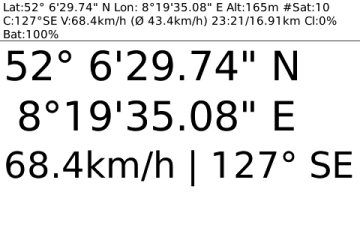 The GPS view allows you to use
your BlackBerry® as a simple GPS device – this view does not
require that you actually logging a path – it’s simply display your
current location in a large font.
The GPS view allows you to use
your BlackBerry® as a simple GPS device – this view does not
require that you actually logging a path – it’s simply display your
current location in a large font.
Hard core Geocaching friends might find this display already sufficient enough to find a location.
Beside the Latitude and Longitude values the current speed and course will be displayed.
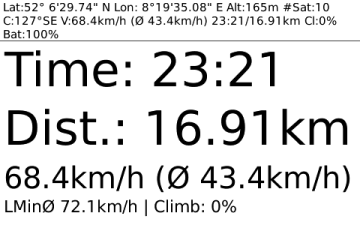 The timing view is
especially for runners and bikers who would like to keep track of their
distance and elapsed time. Additionally to this visual information you
can set up in the GPSLogger II options a distance signal: Peep & vibrate
after a user specified distance.
The timing view is
especially for runners and bikers who would like to keep track of their
distance and elapsed time. Additionally to this visual information you
can set up in the GPSLogger II options a distance signal: Peep & vibrate
after a user specified distance.
E.g. specify (in the options) a distance of 1000m, then GPSLogger II will give you a audio signal & your BlackBerry® Device will vibrate every km. So you get informed that you have completed the user specified distance. Of course the signal comes again after an additional km. So you have the signal at 1km, 2km, 3km... When you want the signal every mile then please enter 5280 ft.
Additionally to the time and distance you will see your current speed and the average speed of your current logging session.
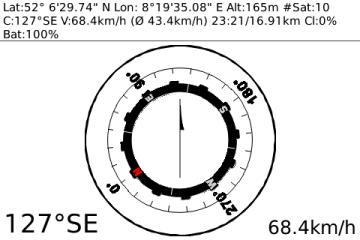 Your BlackBerry®
device does not have a built-in compass. The display of this view
depends on the course calculation of the GPS data received. This means
that you have to move around in order to get valuable course
information from the satellites. The compass does not work when you
just stand still and hold your device in front of you.
Your BlackBerry®
device does not have a built-in compass. The display of this view
depends on the course calculation of the GPS data received. This means
that you have to move around in order to get valuable course
information from the satellites. The compass does not work when you
just stand still and hold your device in front of you.
Once the GPS signal provide course information the red "N" of the compass image will point into the north direction.
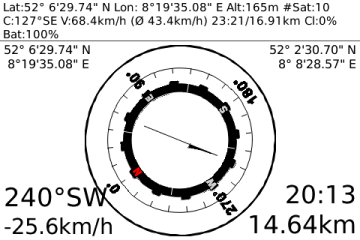 GPSLogger II have a
"Guide me Home" function. This is a) for people who easily
loose orientation like myself ;-) or forget easily where they have
parked their car and b) for people who like Geocaching.
GPSLogger II have a
"Guide me Home" function. This is a) for people who easily
loose orientation like myself ;-) or forget easily where they have
parked their car and b) for people who like Geocaching.
The arrow in the direction view points into the direction of a stored location. When you are currently logging and have not loaded a location, the direction view points you into the direction of your start location.
To reach the location you have to travel into the direction displayed on the device (when the device in pointing to the top you are travelling into the correct direction - when it points to the bottom you are departing from the location).
Beside the direction arrow information you will see at the bottom the distance to the location, the estimated time you need to reach this location (depending on your current speed) and the course in which you have to travel (redundant to the arrow).
Please note that this function is not a navigation replacement - you will be guided into the direction the location - GPSLogger II does not take natural barriers like rivers or canyons into account.
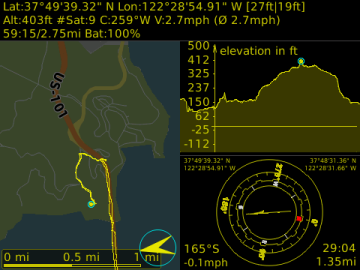 You can toggle at anytime
between day & night mode. This can be done either via the #menu or
you use the [L] key shortcut.
You can toggle at anytime
between day & night mode. This can be done either via the #menu or
you use the [L] key shortcut.
Additionally you can select in the GPSLogger II options your preferred night mode color – you have the choice between red, yellow, blue and green.